第十八章·Promise、async/await
Promises are now used by most modern APIs. It is therefore important to understand how they work and to know how to use them to optimize the code. In this chapter, we'll define in detail what promises are and how to use them in asynchronous operations.
Promise, async/await
Imagine you are a popular book writer, and you are planning to release a new book on a certain day. Readers who have an interest in this book are adding this book to their wishlist and are notified when published or even if the release day got postponed too. On the release day, everyone gets notified and can buy the book making all parties happy. This is a real-life analogy that happens in programming.
- A "producing code" is something that takes time and accomplishes something. Here it's a book writer.
- A "consuming code" is someone who consumes the "producing code" once it's ready. In this case, it's a "reader".
- The linkage between the "producing code" and the "consuming code" can be called a promise as it assures getting the results from the "producing code" to the "consuming code".
Promise
The analogy that we made is also true for the JavaScript promise object. The constructor syntax for the promise object is:
let promise = new Promise(function(resolve, reject) {
  // executor (the producing code, "writer")
});
Here, a function is passed to new Promise also known as the executor, and runs automatically upon creation. It contains the producing code that gives the result. resolve and reject are the arguments provided by the JavaScript itself and are called one of these upon results.
resolve(value):a callback function that returnsvalueupon resultreject(error): a callback function that returnserrorupon error, it returns an error object
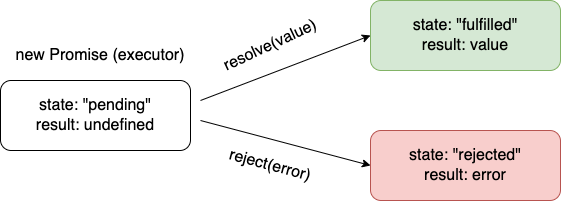
The internal properties of promise object returned by the new Promise constructor are as follows:
state- initiallypending,then changes to eitherfulfilluponresolveorrejectedwhenrejectis calledresult- initiallyundefined, then changes tovalueuponresolveorerrorwhenrejectis called
One cannot access promise properties: state and result. Promise methods are needed to handle promises.
Example of a promise.
let promiseOne = new Promise(function(resolve, reject) {
  // the function is executed automatically when the promise is constructed

  // after 1-second signal that the job is done with the result "done"
  setTimeout(() => resolve("done"), 1000);
})

let promiseTwo = new Promise(function(resolve, reject) {
  // the function is executed automatically when the promise is constructed

  // after 1-second signal that the job is done with the result "error"
  setTimeout(() => reject(new Error("Whoops!")), 1000);
})
Here, the promiseOne is an example of a "fulfilled promise" as it successfully resolves the values, whereas the promiseTwo is a "rejected promise" as it gets rejected. A promise that is neither rejected or resolved is called a settled promise, as opposed to an initially pending promise. Consuming function from the promise can be registered using the .then and .catch methods. We can also add .finally method for performing cleanup or finalizing after previous methods have been completed.
let promiseOne = new Promise(function(resolve, reject) {
  setTimeout(() => resolve("done!"), 1000);
});

// resolve runs the first function in .then
promiseOne.then(
  result => alert(result), // shows "done!" after 1 second
  error => alert(error) // doesn't run
);

let promiseTwo = new Promise(function(resolve, reject) {
  setTimeout(() => reject(new Error("Whoops!")), 1000);
});

// reject runs the second function in .then
promiseTwo.then(
  result => alert(result), // doesn't run
  error => alert(error) // shows "Error: Whoops!" after 1 second
);

let promiseThree = new Promise((resolve, reject) => {
  setTimeout(() => reject(new Error("Whoops!")), 1000);
});

// .catch(f) is the same as promise.then(null, f)
promiseThree.catch(alert); // shows "Error: Whoops!" after 1 second
In the Promise.then() method, both callback arguments are optional.
Async/Await
With promises, one can use a async keyword to declare an asynchronous function that returns a promise whereas the await syntax makes JavaScript wait until that promise settles and returns its value. These keywords make promises easier to write. An example of async is shown below.
//async function f
async function f() {
  return 1;
}
// promise being resolved
f().then(alert); // 1
The above example can be written as follows:
function f() {
  return Promise.resolve(1);
}

f().then(alert); // 1
async ensures that the function returns a promise, and wraps non-promises in it. With await, we can make JavaScript wait until the promise is settled with its value returned.
async function f() {
  let promise = new Promise((resolve, reject) => {
    setTimeout(() => resolve("Welcome to Learn JavaScript!"), 1000)
  });

  let result = await promise; // wait until the promise resolves (*)
  alert(result); // "Welcome to Learn JavaScript!"
}

f();
The await keyword can only be used inside an async function.